
How Do You Validate an AI Product Idea?
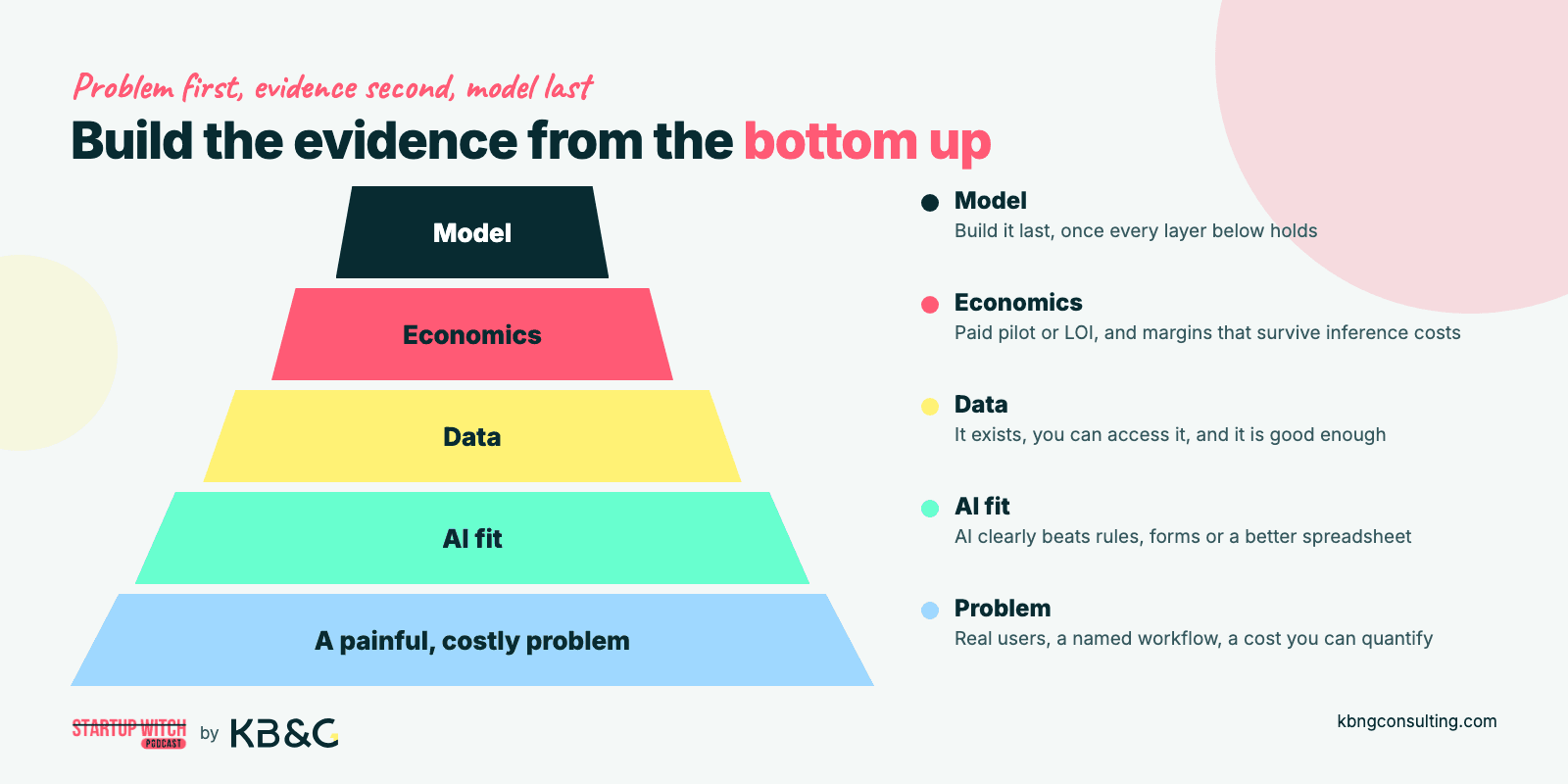
To validate an AI product idea, talk to real users about their actual workflows, test willingness to pay with pilot fees or letters of intent, and simulate the AI with manual processes before writing a single line of production code. That sequence (problem first, evidence second, model last) is how you avoid joining the graveyard of AI startups that built impressive demos nobody needed.
This article covers how to validate an AI product idea end to end: from problem interviews and field discovery to data feasibility checks, Wizard-of-Oz tests, pricing experiments, validating the business model, and structured kill criteria. It is written for founders (pre-seed through Series A) and innovation leads or AI leads inside industrial companies: people who need to de-risk a new AI product before investing heavily in engineering. If you are looking for a guide to model training or MLOps, this is not it.
Why does early validation matter more for AI than for a typical SaaS tool? Because AI is expensive, probabilistic, and trust-sensitive. You are dealing with inference costs, accuracy thresholds, data dependencies and, especially in industrial settings, safety and regulatory constraints where potential risks must be identified early. These are not just technical blockers; they can kill a product even when the model works. Skipping the validation process burns cash and credibility fast. Lack of market need is one of the classic ways startups die, and validation that relies on opinions instead of evidence is how founders walk straight into it.
Here is what you will walk away with:
A step-by-step validation plan you can run in 6–12 weeks
Concrete tests to confirm market demand, data availability, and technical feasibility this month
AI-specific kill criteria so you know when to stop, pivot, or double down
A framework to separate real demand from polite enthusiasm
A quick checklist to track your progress
What "Validating an AI Product Idea" Actually Means
Validation means gathering hard evidence (observed behavior, real data, and economic signals) that real users with real workflows will pay for your AI solution at a price that sustains healthy margins. It is not about collecting compliments on a pitch deck, getting likes on social platforms, or proving that a model can run in a Jupyter notebook.
The word "validation" here covers behavior, data, and economics. You are testing whether the problem is serious and urgent for users, whether AI is the right tool to solve it, whether the necessary data exists and is accessible, and whether someone will hand over money. Positive feedback alone is a weak signal. Real willingness to pay is a stronger validation signal than feedback. Real user demand is confirmed through observed behavior: what people do, not what they say they might do.
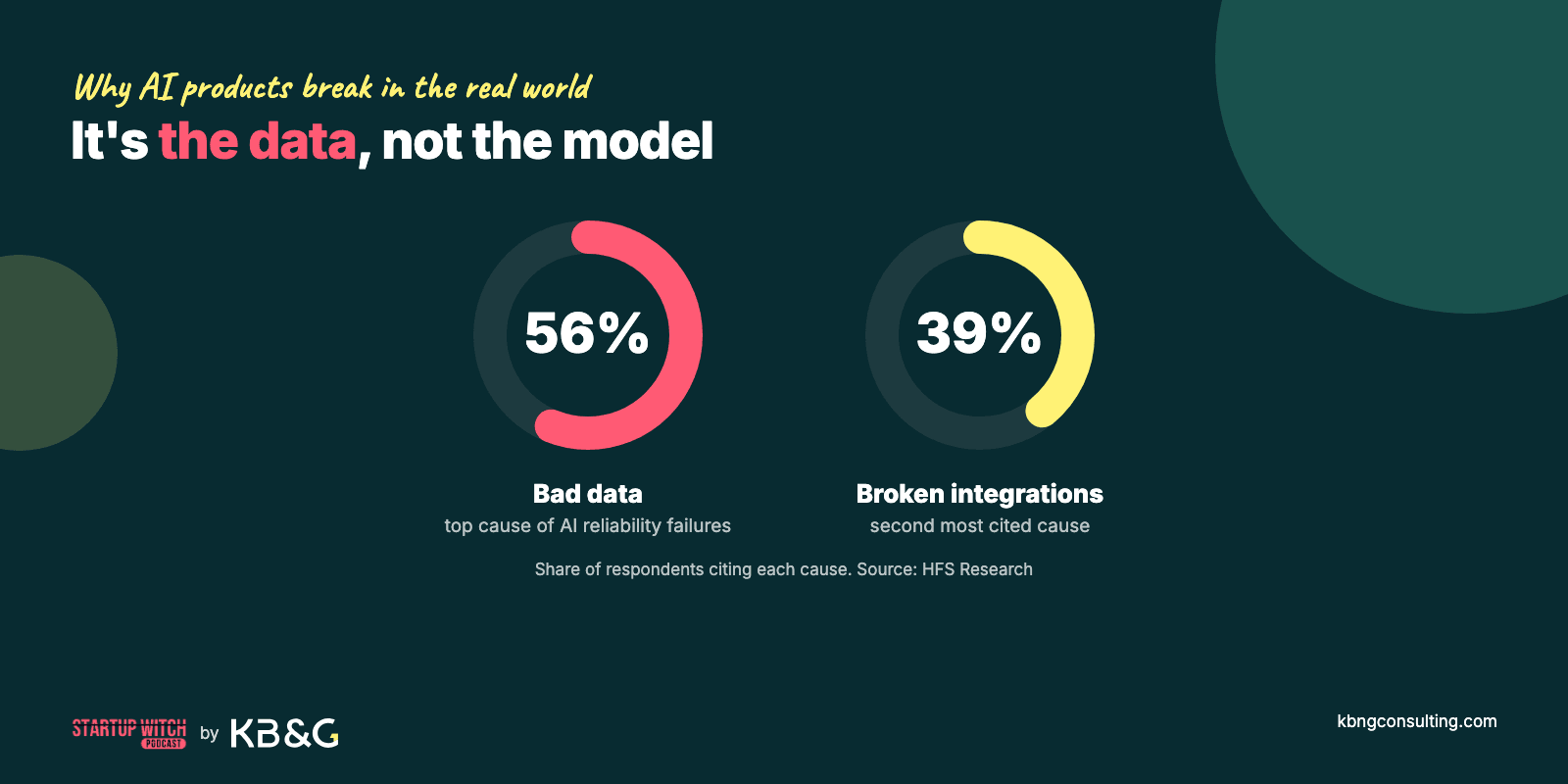
AI validation differs from generic software validation because of several compounding constraints: your outputs are probabilistic (not deterministic), your product depends on data quality and data accessibility, users need to trust outputs that may be wrong some percentage of the time, and regulatory or safety requirements can impose hard accuracy floors. According to HFS Research, the top causes of AI reliability failures were bad data (56%) and broken integrations (39%), not the model itself.
Problem–Solution Fit vs. Product–Market Fit in AI
Problem–solution fit means you have proved a painful problem exists and that your proposed solution removes enough friction, cost, or risk to matter. Product–market fit means you have a repeatable pattern of potential customers adopting and paying for a packaged product, beyond one-off pilots and "innovation budgets."
This article focuses on getting you to problem–solution fit first, with signals that hint at early product–market fit. Many AI founders jump straight to model metrics and benchmark scores before confirming the problem is worth solving at all. That is backwards. Spend serious time finding demand before building anything.
How AI Validation Differs from Traditional SaaS Validation
There are at least four AI-specific wrinkles you must account for:
Probabilistic outputs: Your AI model will be wrong sometimes. You must validate how much error your target audience will tolerate, and where errors become dangerous or deal-breaking.
Accuracy thresholds: AI must demonstrate measurable improvement over current solutions. If a rule engine gets you 80% of the way at 20% of the cost, the AI pitch collapses.
Data dependence: AI applications are constrained by the availability of quality data. No data, no product, regardless of how good the model architecture is.
Trust and explainability: In high-risk domains, users need to understand why the AI made a decision. Human-in-the-loop verification, audit trails, and explainability are often non-negotiable.
Consider the contrast: an AI tool that suggests email copy for marketers can tolerate moderate error rates because the human reviews and edits every output. An AI system that detects near-miss safety incidents in a mine cannot afford to miss critical events; a single false negative could mean someone gets hurt. The same principle applies across domains: error tolerance shapes the entire validation process.
Because AI has these extra constraints, your validation steps must include field discovery, data checks, and workflow simulations, not just landing pages and surveys.
Step 1: Start With a Concrete Problem, Not the Model
Before you talk about LLMs, computer vision, or custom models, you must prove the problem is real and expensive. Real problems cause measurable loss in time or money. If you cannot point to a specific workflow where someone is bleeding hours, money, or safety risk, you do not have a validated problem. You have a hypothesis.
You need one clearly defined use case tied to a role, a workflow, and a context. Not "improve safety in mining" but "blast engineers on a copper mine site reviewing misfires from yesterday's shift." Specificity is what separates an AI startup idea from a validated opportunity.
Find and Prioritize a Painful Workflow
Look for tasks that are frequent, manual, error-prone, or compliance-heavy: places where delays or mistakes cost real money or create safety exposure. Good candidates include:
Safety incident reporting and near-miss documentation in mining or construction
Invoice coding and exception handling in finance
Ticket triage and routing in customer support
Quality inspection on manufacturing lines
Pick one narrow workflow. Write a before/after story in four to five sentences: what happens today (the pain points), what would happen with your solution, and what changes for the user. This forces clarity. If you cannot write that story crisply, your idea is too vague.
Quantify the Cost of the Problem With Rough Numbers
"Annoying" is not a business case. Founders should quantify the cost of the problem being solved. Use back-of-envelope math: time wasted per event × frequency × hourly cost × number of sites or teams.
Example: if safety officers spend 6 hours per week on manual incident transcription at $50/hour across 10 sites, that is roughly $156,000 per year just on one repetitive task. That is a problem worth solving. If your math shows the problem costs a customer €500 per year, your idea solves a nuisance, not a business pain, and you will struggle to generate revenue.
You are looking for problems worth at least tens of thousands per year per account. Anything less, and the sales cycle will eat your margins.
Document Current Workarounds and "Good Enough" Tools
List every existing tool and manual workaround your potential users rely on: Excel spreadsheets, WhatsApp photo threads, radio calls, paper forms, email chains, shadow IT apps on personal phones. Every workaround is a signal of real demand, but also your baseline competitor.
Pay attention to where humans introduce delays, errors, or blind spots. Those are the gaps where AI could realistically add real value. But do not underestimate the current solution. If people have been living with a workaround for years, switching costs are real.
You now know where the pain likely is. Next you must confirm real users feel it the way you think.
Step 2: Run Problem Interviews and Field Discovery
Talking to real people in their actual environment is the fastest way to kill or sharpen an AI idea. This step is about understanding problems and context, not pitching your solution or showing a demo. Effective validation methods include customer interviews and prototype testing, and this is where interviews come first.
How to Structure Problem Interviews (Without Leading People)
Run 30–45 minute calls with end users, decision-makers, and adjacent roles. Customer interviews can identify user pain points and adoption potential, but only if you ask the right questions.
Focus on past behavior, not hypotheticals:
"Tell me about the last time you had to deal with [problem]."
"Walk me through yesterday's shift from start to end."
"What took the longest? What frustrated you most?"
"How did you handle it? What tools did you use?"
"What happened when something went wrong?"
"How much time did that cost you or your team?"
"Have you tried to fix this before? What happened?"
Never ask "Would you use an AI that does X?" That is a hypothetical question and the answer is meaningless. People will say yes to be polite. Record anonymized quotes and specific episodes, not vague sentiments. You want real conversations that surface real behavior.
Field Discovery and Site Visits in Industrial Settings
If your target audience works in mining, construction, manufacturing, or any asset-heavy environment, you must do site visits. A good site visit means shadowing shifts, listening to radio traffic, observing handovers and paperwork, and seeing where data actually lives.
Capture workflow details: which tools are in use, what data sources exist, who actually does the work versus who signs the contracts. Pay particular attention to things that affect AI feasibility:
Noise levels for voice AI: radio audio on a mine site may have terrible signal-to-noise ratio
Lighting and occlusion for computer vision: dust, vibration, low light underground
Connectivity constraints: no reliable internet in remote pits or underground tunnels
Data silos: operators storing critical information in on-prem systems, paper logs, or personal devices
Take photos and sketches of workflows, screens, and physical whiteboards where data currently lives (with permission). These artifacts are worth more than a dozen Zoom calls.
Extracting Behavioral Evidence From Interviews and Visits
Turn raw notes into structured signals. For each conversation, score problem severity and urgency on a simple 1–5 scale. The goal is to gather feedback from interviews and visits in a form you can compare across users. Track frequency of problem mentions, emotional intensity, workarounds people have built, and any explicit statements like "I would pay to get rid of this."
Good evidence looks like this: multiple independent users describing the same painful steps without prompting. If three different safety supervisors at three different sites independently describe the same problem (spending hours manually transcribing incident reports), that is strong validation. If only one person mentions it and they are the innovation manager who never touches the workflow, your confidence should be low. Repeated evidence also helps surface potential risks in workflow adoption or deployment.
Once the problem is clearly validated, you can test whether AI is the right way to fix it.
Step 3: Validate That AI Is the Right Tool for This Problem
Not every real problem needs AI. Some can be solved cheaper with better forms, simple automation, or process changes. AI should only be used when it adds real value. This step is about proving where AI offers a clear edge, and being honest when it does not.
Map the Problem to an AI-Capable Task
AI is useful for handling unstructured data and complex pattern recognition tasks. Rewrite your problem as a concrete AI task using standard capability categories:
Classification: categorizing incidents by severity level
Extraction: pulling structured fields from unstructured radio transcripts
Summarization: generating daily safety digests from shift logs
Anomaly detection: flagging unusual sensor readings in real time
Prediction: forecasting equipment failure based on operating patterns
Generation: drafting compliance reports from structured data
For example, "detect near-miss events from radio logs" becomes extraction + classification + summarization. If this mapping fails, because the problem is mainly political, organizational, or process-driven, that is a red flag. AI is not the answer to every problem.
Founders should also confirm whether suitable foundation models exist for their specific task. If no pre-trained model comes close to handling your domain, the AI research and development effort may be prohibitively large for an early-stage team.
Benchmark Against Non-AI Alternatives
Before committing to an AI approach, list non-AI options: simple if/then rules, workflow automation tools, manual QA checklists, better digital forms, or basic sensors with threshold alerts. Your competitors might not be other AI apps. They might be a well-designed spreadsheet.
Run a quick comparison:
Dimension | Non-AI Alternative | AI Solution |
|---|---|---|
Achievable accuracy | Often good enough for simple, predictable cases | Stronger on messy, unstructured inputs, given enough data |
Setup cost | Low | Medium to high |
Maintenance burden | Minimal | Ongoing retraining needed |
Change management | Low | Medium (trust, training) |
Handles edge cases | Poorly | Better with sufficient data |
If a rule-based system achieves 80–90% of the outcome at a fraction of the cost, you should either simplify the product or rethink the AI pitch entirely. In competitor analysis, focus on features only when they create a clear advantage over the non-AI option; sometimes the real answer is that AI is overkill.
Define Acceptable Accuracy and Error Boundaries
For each use case, define what "good enough" performance looks like in numbers. AI products must meet accuracy and reliability expectations, and those expectations vary wildly by domain.
Set explicit thresholds for precision, recall, false positive rates, false negative rates, and latency. For safety-critical AI (flagging potential fatalities), you might need recall above 95% and latency under 30 seconds. For a content suggestion tool, 70% relevance with human review might be perfectly fine.
These thresholds become part of your kill criteria and pilot success metrics later. Write them down now.
Once you know AI could add meaningful value, you must check whether the data to power it actually exists and is accessible.
Step 4: Validate the Data Layer Before You Build
Many AI products die not in Figma or PyTorch, but in SharePoint, radios, and siloed databases. Validating AI ideas requires assessing data availability and quality before you write model code. A data feasibility audit verifies access to the proprietary data you need; without it, your technical feasibility is unproven.
Inventory Real Data Sources and Gaps
List every actual data source involved in the target workflow: ERPs, SCADA systems, radio communications, cameras, PDFs, inspection forms, emails, Excel sheets, handheld devices. For each source, note:
Format: text, audio, image, video, structured database
Volume: how much data per week or per shift
Location: on-premises server, cloud, paper binder, personal phone
Typical surprises in industrial contexts include radio-only communication with no transcription, photos stored on personal phones with no centralized access, and shadow IT spreadsheets that contain the most useful operational data. You often discover the most critical data lives in the least accessible place.
Check Ownership, Permissions, and Compliance
You must know who owns each key data source: the operator, the OEM, the subcontractor, or a third-party integrator. In industrial environments, data ownership is often fragmented across multiple parties, and none of them may be enthusiastic about sharing.
Compliance with data privacy laws matters from day one. Worker privacy rules around audio and video recording, geo-specific data residency requirements, and contractual data-sharing restrictions can all block your access to the necessary data. Involve legal and compliance teams early to agree on what can be used for model training versus in-product inference.
Assess Data Quality, Representativeness, and Refresh Needs
Pull 100–500 recent examples from your target data sources and manually inspect them. Look for missing fields, labeling inconsistencies, noise, and edge cases. This hands-on sampling tells you more about feasibility than any architecture diagram.
You need diversity across sites, shifts, equipment types, and user groups to avoid building a brittle AI model that works in one context and fails everywhere else. A model trained only on daytime data from one mine will perform poorly on night shifts at a different site with different equipment.
Also consider refresh cadence: is this static historical data you can train on once, or continuous streaming data that requires ongoing monitoring and retraining? The cost of that retraining loop matters for your unit economics.
Once data feasibility looks sane, you can test the idea with users without committing to full models.
Step 5: Prototype the Experience Without Full AI
The goal here is to simulate the AI product's impact on the workflow as quickly and cheaply as possible. Simulating AI capabilities with manual processes can reveal whether demand exists without the expense of building the real thing. This is where Wizard-of-Oz tests, concierge services, and rule-based mimics earn their keep.
Wizard-of-Oz Tests: Fake the AI Behind the UI
In a Wizard-of-Oz test, users interact with what looks like an AI-powered interface. Behind the scenes, a human (you, an analyst, a domain expert) produces the outputs manually. The user does not know.
A simple test might work like this: supervisors upload a shift log through a web form, and your "system" returns structured incidents and recommendations within an agreed time window. Users experience the promised output before full automation exists. You are the AI.
Measure whether users understand the outputs, how often they act on them, what corrections they make, and whether they come back the next day. User behavior should be measured through repeat usage and acceptance of AI output, not through one-time reactions.
Concierge and Manual-First Experiments
Run the product as a service for a small group of design partners. For four weeks, manually transcribe radio logs, structure events, and send daily safety digests as if AI did it. This surfaces hidden constraints (file format quirks, language ambiguities, missing context) that you would never discover from a whiteboard.
Offer this to 3–5 design partners at a pilot fee, not for free, and use the manual version to test the core features before automating them. If they will not pay even a modest amount for the manual version, they will not pay for the automated one. Testing demand through pilots or pre-sales is stronger evidence than interest alone. A simple landing page can also measure conversion rates and buyer interest before or alongside a concierge test. Demand experiments should measure real financial commitments rather than mere interest.
LLM- and Rule-Based Prototypes for Early Signal
Use off-the-shelf models (API-based LLMs, pre-trained vision models) plus simple rules to approximate the final behavior. Prototyping with existing APIs can test core user experience and output quality without months of custom development. This is your basic version, your simple MVP.
Do not over-optimize. The goal is directional signal on output quality, edge cases, and user reactions. Collect these metrics:
Task completion rate: what percentage of tasks does the prototype handle without human intervention?
Corrections per output: how many edits does the user make?
Time saved vs. baseline: compared to the current workflow, how much faster?
Repeat usage: do users come back after the first week?
An MVP is a simplified version of your product: not a half-baked product, but a focused test of your core hypothesis.
Once users have seen and touched something, you can safely ask if they would pay, and how much.
Step 6: Test Market Demand, Willingness to Pay, and Commercial Viability
Without willingness to pay at sustainable margins, you do not have a product. You have a demo. AI-specific costs (inference, GPU time, human review) make it critical to validate pricing and unit economics early, not after months of building.
Convert Interest Into Concrete Commitments
Define what counts as a commitment signal: pilot fees, letters of intent, signed trial agreements, data-sharing contracts, internal sponsorship from a budget holder who controls actual money. "Come back when it's ready" is a weak signal. Actual budget allocation and data access permissions are strong ones.
Frame a pilot offer with clear terms: defined duration (8–12 weeks), specific scope, and success metrics tied to business outcomes (incident reporting completeness, hours saved, compliance improvement). Every engagement must involve the user putting something on the line: time, data, or money.
Run Simple Pricing Experiments
Start with 2–3 pricing models to test: per-seat, per-site, or usage-based (per shift, per thousand inferences, per incident analyzed). Testing different pricing structures shows whether the broader business model is sustainable for your target audience.
Anchor pricing to business value (fraction of time saved, risk avoided, cost eliminated), not to your raw compute costs. Techniques include price-anchored pilot proposals, "good/better/best" tiered options, or willingness-to-pay questions after users have experienced a prototype. Market validation happens when someone writes a check, not when they nod approvingly.
Rough-Order Unit Economics for AI Products
Walk through a simple model: revenue per customer per year minus estimated model/API costs, human-in-the-loop effort, integration work, and support overhead. You can approximate inference costs even at prototype stage using vendor pricing calculators and expected usage volume.
Economic viability of AI products depends on maintaining healthy gross margins. Your rough unit economics should also account for risks such as unexpectedly high review labor, integration delays, or usage patterns that increase delivery cost. Red flags include:
Cost of delivery scaling linearly with usage (no leverage)
Pricing that must be far above market norms to break even
Human-in-the-loop costs that do not decrease as the model improves
Infrastructure requirements that explode with each new customer site
If your rough unit economics look broken at 10 customers, they will not magically fix themselves at 100. Get honest about this before moving forward.
With demand, data, and basic economics validated, you now need a clear, time-bound validation plan and kill criteria.
Step 7: Build a Time-Boxed Validation Plan With Kill Criteria
Validation should be a 4–12 week project with explicit success and failure conditions, not a vague "we're still learning" that stretches into months. Kill criteria protect you from sunk-cost bias and endless pilots. Write a simple validation scorecard before you start so the decision is structured, not emotional.
Define a Short, Sharp Validation Roadmap
An 8-week plan for an enterprise AI product might look like this. The goal is repeatable evidence for a go/no-go decision rather than ad hoc tests:
Example: 8-week validation plan for AI safety monitoring in mining
Weeks 1–2 (Discovery): Conduct 10–15 problem interviews with safety supervisors, blast engineers, and site managers across 2 mine sites. Complete 2 site visits. Deliverable: validated problem statement with severity scores.
Weeks 3–5 (Fake-it prototype): Run Wizard-of-Oz test with 3 design partners. Manually produce daily safety digests from radio logs. Measure time saved, output corrections, and repeat engagement. Deliverable: prototype usage data and qualitative feedback.
Weeks 6–8 (Pilot and decision): Convert 1–2 design partners to paid pilots. Present pricing options. Collect commitment signals. Deliverable: signed pilot agreement or documented kill decision.
For each phase, specify the objective, experiments to run, number of customers involved, and expected outputs. Do not leave phases open-ended.
Set Quantitative Success Metrics Upfront
Define target thresholds before starting. Example targets by stage:
Discovery: 10+ interviews completed, average problem severity score above 3.5/5, at least 3 potential customers describing the same problem independently
Prototype: 70%+ task completion rate, fewer than 2 corrections per output, 30%+ time saved versus baseline
Pilot: measurable business outcomes (e.g., 2x increase in near-miss reporting, 50% reduction in manual transcription hours)
Set a clear threshold: "We continue only if at least 3 customers agree to paid pilots by week 8." These metrics must be co-defined with stakeholders, especially in industrial and regulated environments where "success" has safety implications.
Kill, Pivot, or Double-Down Criteria
Define your kill, pivot, and invest scenarios in advance and write them down. A good validation process gives you a clear answer, not a maybe.
AI-specific kill triggers include:
No paying pilot commitments by the end of the validation window
Accuracy ceiling too low for safety-critical decisions after prototype testing
Data access blocked by legal, ownership, or practical barriers
Persistent hallucinations on critical workflows that cannot be mitigated
Latency or connectivity constraints making real-time inference impossible at the edge
Cost per operation so high that pricing would exceed what the market will bear
Document these criteria in writing. Communicate them internally to align your team and sponsors. If you hit a kill trigger, you have not failed. You have saved yourself months of waste and can redirect with confidence toward a pivot or a different idea.
Even with a good plan, there are recurring failure modes you can avoid.
Common Pitfalls When Validating an AI Startup Idea
Founders and innovation teams repeatedly stumble at the same points, and most of them come down to trusting opinions over evidence. Here are the common mistakes and how to avoid them.
Talking to the Wrong People
There are three distinct roles in any purchase decision: the end user (who feels the pain), the champion (who advocates internally), and the economic buyer (who controls the budget). You need all three in your validation.
The biggest risk is validating only with "innovation teams" or friendly managers who are removed from the actual workflow. They will tell you the idea sounds great, because it is not their job that changes. Market research must include the people who will actually use the product daily. Map stakeholders in each target account and make sure you have real conversations with frontline workers, not just executives.
Confusing Model Demos With Product Validation
An impressive one-off demo in a notebook or playground is not validation. It is a party trick. Validation must show impact on real tasks over time: repeat usage, integrated workflow, measurable outcomes. Founders should validate user demand through observed behavior, not applause in a meeting.
Practical guardrail: every demo must be tied to a next step that involves user behavior or commitment. If the demo does not lead to a pilot conversation, a data-sharing agreement, or a scheduled follow-up with the budget owner, it was entertainment, not validation.
Ignoring Human Factors and Workflow Fit
Even accurate AI fails if it adds friction, breaks existing rhythms, or threatens someone's role. Operators will refuse to use tablets in dusty environments. Supervisors will ignore automated alerts delivered through the wrong channel or at the wrong time. The competitive landscape includes not just other AI tools but the user's inertia and existing habits.
Test delivery channels and interaction patterns (radio integrations, SMS, dashboards, printed reports) as part of your validation, and gather feedback on those workflow choices during testing, not just on model accuracy. A solution that requires workers to change three established habits will fail regardless of its accuracy.
Underestimating Data Reality and Integration Burden
Most founders underestimate how hard data access and integration are. Data is frequently incomplete, siloed, or controlled by third parties, especially in legacy industrial stacks. Do not assume "we'll just plug into their systems" without a concrete integration path, tested permissions, and documented API access.
A useful sanity check: if integration work dwarfs model work, your startup idea may not be viable for a small team or early-stage budget. Competitor analysis helps here too: it reveals which integration problems other teams have already failed to solve.
If you avoid these pitfalls and follow the earlier steps, you end up with a clear yes or no on your AI product idea, instead of years in "pilot purgatory."
Conclusion and Concrete Next Steps
Validating an AI product idea tests market demand and technical feasibility before you commit engineering resources. The process boils down to: validate the problem, the workflow, the data, the AI's edge, and the economics, using real behavior and time-boxed tests, not opinions and demos.
How to validate an AI product idea comes down to structured real conversations, cheap simulations, and ruthless kill criteria, not perfect models. You can validate most assumptions within 6–12 weeks if you stay disciplined.
Here are your next steps, things you can do this week:
Pick one narrow use case and write the before/after story in five sentences.
Book 5–10 problem interviews with real users (and at least one site visit if you are targeting industrial settings).
Sketch a Wizard-of-Oz test and identify one design partner to run it with.
Draft a simple pilot offer with success metrics and a price.
Write down your 8–12 week validation plan and kill criteria.
If you want a partner for the build once the evidence is in, KB&G's Innovation Studio co-builds AI products with founders.
Quick Validation Checklist for Your AI Product Idea
Use this as a compact reference. If you cannot check most of these boxes, you are not ready to build the full AI product yet, and knowing that is a win, because you have saved yourself months of waste.
Problem & Users:
Have you spoken to at least 10 real users about their current workflow and recent problems?
Can you quantify the annual cost or risk of the problem for a typical customer?
Do multiple independent users describe the same problem without prompting?
Have you identified who the end user, champion, and economic buyer are?
AI Fit & Data:
Can you clearly express the core AI task (classify, predict, extract, summarize)?
Have you benchmarked the AI approach against non-AI alternatives?
Do you know what data you need, where it lives, and who owns it?
Have you sampled real data to check quality, diversity, and edge cases?
Have you defined acceptable accuracy and error boundaries for your use case?
Prototypes & Behavior:
Have users interacted with a fake or partial version (Wizard-of-Oz, concierge, rule-based prototype)?
Do you have evidence of time saved, errors reduced, or better informed decisions made?
Are users coming back after the first interaction, or was it a one-time novelty?
Have you tested the delivery channel and interaction pattern (not just the AI output)?
Money & Decisions:
Has at least one buyer offered to pay for a pilot or signed a letter of intent?
Do you have a rough view of unit economics, including AI-specific inference and human review costs?
Have you tested at least two pricing structures with potential customers?
Have you written down kill criteria and a decision date?
If most boxes are unchecked, you are not ready to build, and that clarity is exactly what the validation process is designed to give you.